What Should a Recruitment Agency Expect From a CRM Migration?
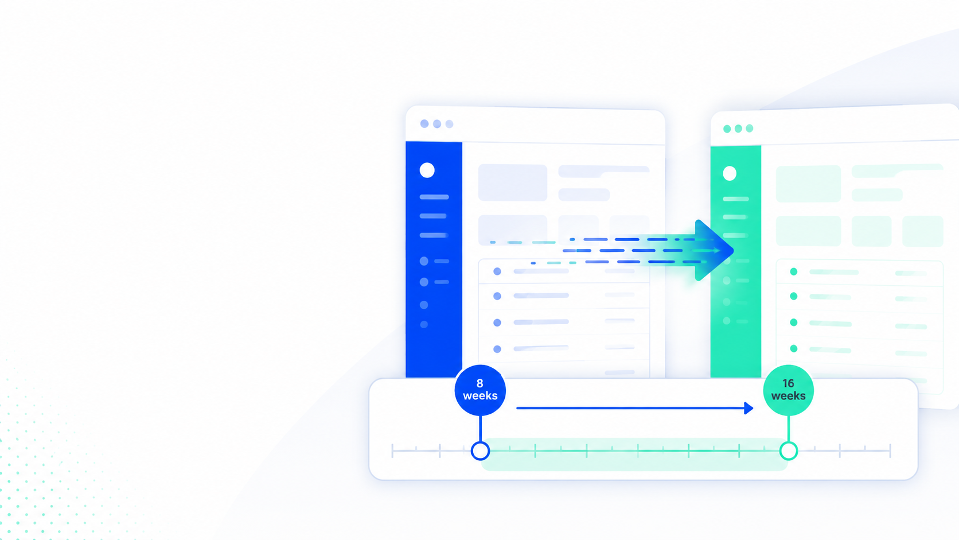
For a mid-market recruitment agency, CRM migration usually takes at least 8 weeks and can run to 16 weeks or more depending on data complexity.
Written by Harry Whysall, Account Executive at Imagine AI. 8 years in recruitment tech, including time selling CRM and automation tools to scaling agencies.
Quick answer: For a mid-market recruitment agency (10-50 staff), a CRM migration typically takes a minimum of 8 weeks and can run to 16 weeks or more depending on data complexity, agency size, and how well-known your outgoing system is. Rushing it is one of the most common causes of post-go-live problems.
Why migration takes longer than most agencies expect
Most agencies think of migration as the part that happens after the hard decisions are made. In reality, it's where a lot of projects quietly go wrong, not from a bad choice of system, but from underestimating what the process actually involves.
Migration isn't just moving data from one place to another. It's extracting data from a system that may not want to give it up cleanly, mapping it into a completely different structure, testing it against how your business actually works, training the team, and going live without losing anything critical in the gap. Done properly, it's an 8-16 week process. Done badly, it's the reason agencies end up on a new system they never fully adopt.
The stages of a CRM migration
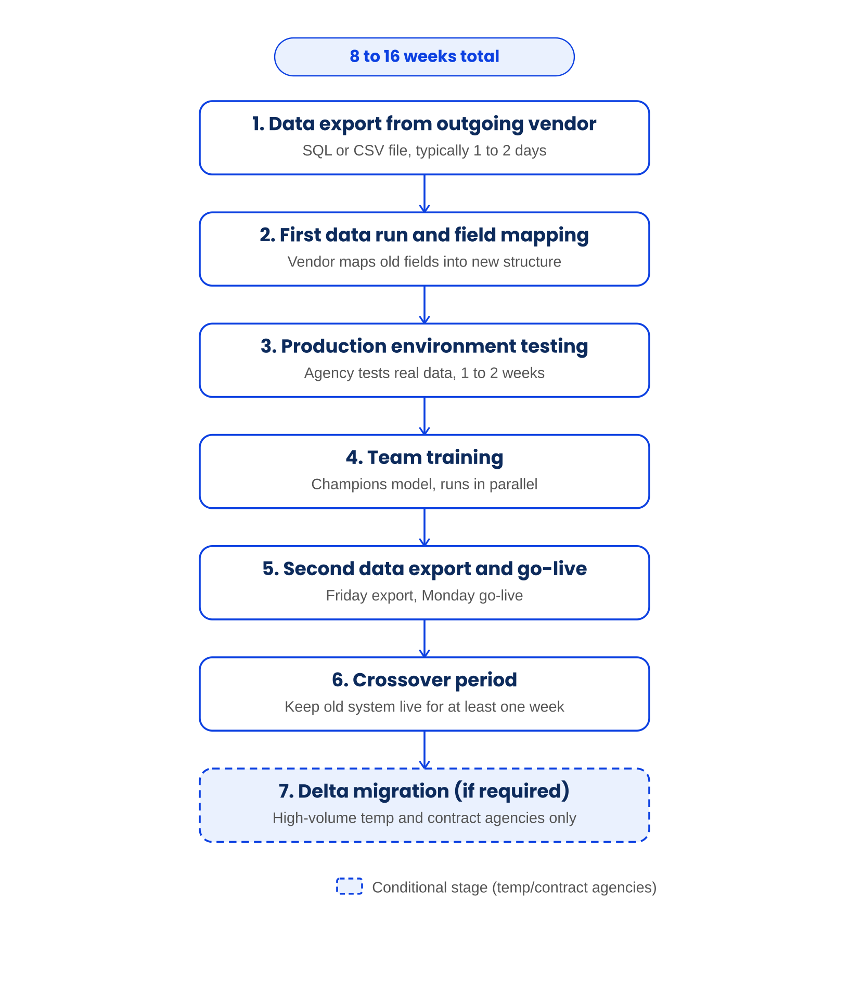
1. Getting your data out of your current system
The first thing to nail down is what format your current provider will export your data in, and how long it will take them.
Most providers will export a raw SQL file, which in most cases is perfectly workable for your new vendor. Some export CSVs. Occasionally, particularly with older or legacy systems, the format is something more unusual and harder to work with. In rare cases, vendors have refused to provide detailed data migration exports at all, citing their own data formatting protections. That creates a real problem and is something worth raising during your review process before you sign a contract with your outgoing provider's replacement.
Budget a couple of days for this step. With modern software it can be faster, but it depends entirely on the outgoing vendor's process and responsiveness.
2. First data run and field mapping
Once the data file is with your new vendor, they'll start mapping it into their own structure: aligning your old terminology to theirs, reconciling differences in how records are named and categorised, and cleaning up any inconsistencies.
Your new vendor will then come back to you with a breakdown showing what your previous field headings were, how that data has been mapped, and where any changes are proposed. You'll be asked to sign off on this, or request amendments, before anything goes into a live environment.
3. Production environment testing
After the first mapping is agreed, your vendor will run an initial import into a production environment: a version of your new system populated with your actual data, but not yet live.
This is handed back to you to test. Typically you'll have one to two weeks for this. The key thing to understand at this stage is that you're not looking for new data, you're checking that your existing data looks right in the new system. Does your candidate history read correctly? Are your job records intact? Are custom fields mapped where you'd expect them?
Any concerns or changes get reported back, the vendor amends, and you sign off before anything goes live.
4. Training the team
While the production environment is being tested and refined, training should be running in parallel. Waiting until go-live to train the team is one of the most common migration mistakes.
The most effective approach for agencies of 10-50 people is a champions model: identify two or three people internally who will take deep ownership of the system, train them thoroughly first, and then have them take on a train-the-trainer role with the rest of the business. Trying to get 50 people trained in one session rarely works. Questions compound, focus drops, and the message gets diluted.
Your vendor should provide structured training sessions, Q&A sessions, online training materials, and a help centre for end users. Push for smaller group sessions split by function where possible: your perm desk has different day-to-day workflows to your contract desk, and training is more effective when it reflects that.
5. Second data export and go-live
Once training is underway and the production environment is signed off, it's time for the second data export from your outgoing system. This one should be faster and cleaner than the first, since the mapping work is already done.
The timing of this export matters. Taking it on a Friday afternoon is the standard approach: your new vendor imports overnight, and you can go live Monday morning on fresh data with the minimum gap between export and go-live. Depending on your new vendor's process, the import can take anywhere from one working day to four or five, so pre-schedule this slot with them well in advance rather than assuming availability.
One strong recommendation: keep access to your old system running for at least one week post-go-live. Not as a fallback to continue using it, but as a reference point for anything that looks off or any data that needs cross-checking before you fully close it down.
6. Delta migration for high-volume temp and contract-heavy agencies
For permanent-focused agencies, a gap of one to five working days in which new data isn't yet on the new system is manageable. For high-volume temporary businesses or agencies with significant contract books, it isn't. Compliance issues and missing placements make that gap a real operational problem.
What a delta migration captures
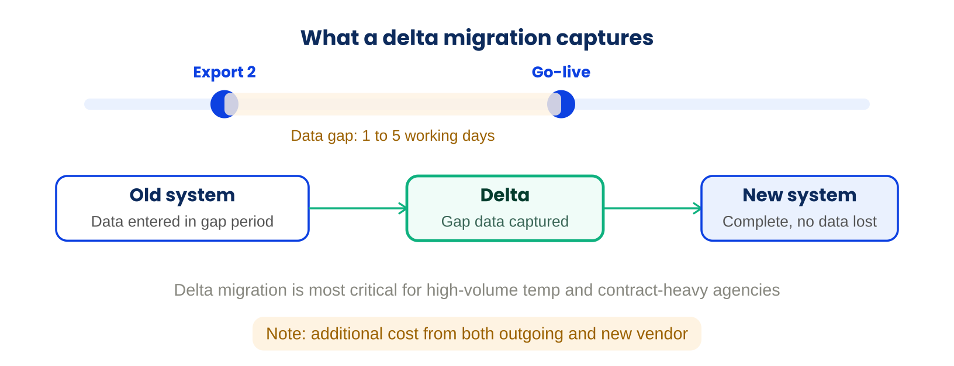
This is where a delta migration comes in. After go-live, the vendor goes back to your old system and captures everything that was entered during the migration window, the period between your second data export and go-live. That data is then imported into your live environment so nothing is lost.
There are two things to factor in here: your outgoing vendor will charge for this additional export, and your new vendor may also have a cost for the additional import work. Neither should be a surprise. Both need to be scoped into your migration plan and commercial agreement before you start.
What a migration actually costs internally
Beyond vendor fees, migration has a real internal cost in time that most agencies underestimate. You'll need at least two or three people internally who are consistently available across the process: checking data, attending training, managing the project, and responding to vendor requests promptly.
Your new vendor should run the project via a shared project board so you can see every milestone, dependency, and deadline. If they don't offer this, ask for it. And make sure annual leave, on both sides, is mapped against the timeline from the start. A key internal contact being on holiday during the testing window is one of the most common causes of avoidable delay.
Data export costs to plan for
None of these should be a surprise if they're scoped properly at the commercial stage of your review.
- First export: Should be free from your outgoing vendor in the vast majority of cases.
- Second export: Usually comes with a cost, typically modest.
- Delta migration export, if needed: Additional charge from your outgoing vendor, plus potentially from your new vendor for the import.
Migration reality
"Rushing migration is one of the most common causes of post-go-live problems."
Quick answers
How long does CRM migration take for a recruitment agency?
For an agency of 10 or more staff, expect a minimum of 8 weeks. Depending on data complexity, the volume of your contract book, and how well-known your outgoing system is, it can run to 16 weeks or longer. Phased rollouts for larger or more complex agencies can extend this further.
How many data exports will we need from our current CRM?
At least two: one for the production environment testing phase and one for go-live. High-volume temporary agencies or those with large contract books will typically need a third, the delta migration, to capture data entered during the migration window.
Can we go live faster than 8 weeks?
Sometimes. If your outgoing system is well-known, your new vendor may have pre-built migration scripts already, which removes some of the mapping time. Coming from a major platform like Bullhorn, as an example, is typically faster than migrating from a niche or legacy system where scripts need to be built from scratch.
Should we run both systems at the same time after go-live?
Yes, for at least one week. Not to actively use the old system, but to have it as a reference point while the team settles in. This is a safety net, not a reason to delay adoption of the new platform.